Explanation, Common Issues, and How to Fix Mismatched Final URL Errors
Running successful Google Ads campaigns is more than just setting the right keywords—it also requires accurate tracking for performance measurement. A critical piece of this is the tracking template, which, if misconfigured, can trigger ad disapprovals due to Final URL mismatches.
In this blog, we’ll walk you through a real-life issue using ABC Primary Care as an example, explaining how tracking templates work, why mismatches occur, and how to fix them the right way.
What Is a Google Ads Tracking Template?
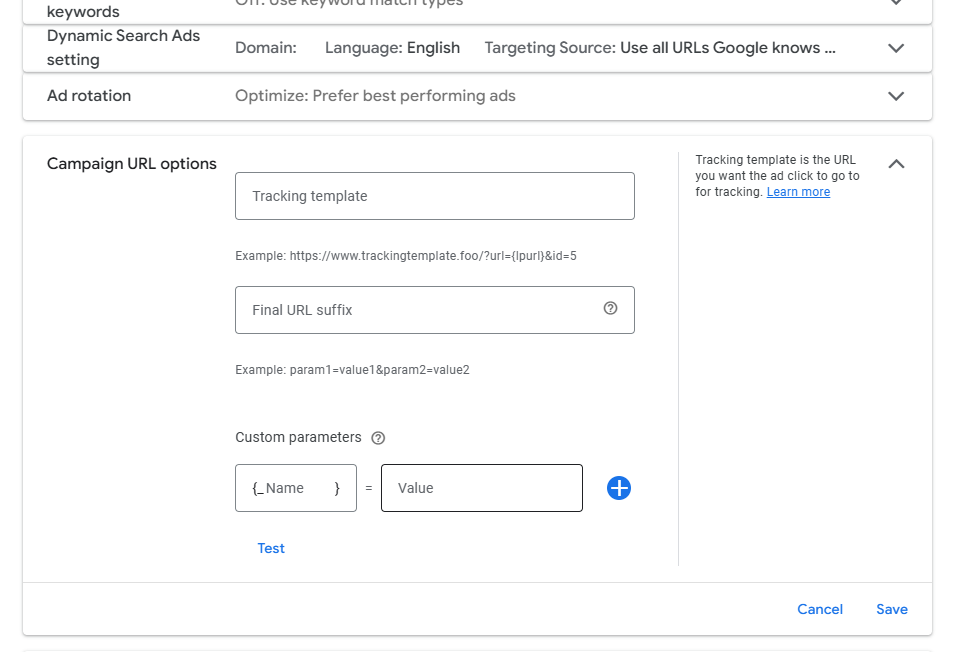
A tracking template is a feature in Google Ads that appends custom parameters to the URL when someone clicks your ad. It lets you pass campaign and click data to third-party analytics tools or custom trackers.
Example:
https://yourtracker.com/?url={lpurl}&source=google&campaign=my_campaign
Here, {lpurl} is dynamically replaced with your ad’s Final URL, and your tracker logs that data.
Problem Summary: Case of ABC Primary Care
Let’s take a look at a common setup that caused issues for ABC Primary Care’s ad campaign.
Tracking Template:
https://yourtracker.com/?url={lpurl}&source=google&campaign=abc_primarycare
Final URL:
https://abcprimarycaretx.com/
Final URL Suffix:
utm_source=google&utm_medium=cpc&utm_campaign=abc_primarycare
What Went Wrong?
Google combines {lpurl} with the suffix, then encodes it. The tracking URL becomes:
https://yourtracker.com/?url=https%3A%2F%2Fabcprimarycaretx.com%2F%3Futm_source%3Dgoogle%26utm_medium%3Dcpc%26utm_campaign%3Dabc_primarycare&source=google&campaign=abc_primarycare
Now, Google sees a redirected, encoded URL that does not match the Final URL, leading to a mismatched Final URL error.
Why This Happens
Here’s the technical explanation:
– {lpurl} is replaced with your Final URL plus the suffix
– This entire URL is then URL-encoded
– The encoded version is passed through your tracking domain
– The destination URL looks different from the declared Final URL
– Google flags it as a mismatch—even though the user ends up in the right place
Why Tracking Templates Are Important in Google Ads
Tracking templates play a vital role in how advertisers track, analyze, and optimize their Google Ads campaigns. Here’s why they matter:
1. Accurate Campaign Attribution
Tracking templates let you append UTM parameters or dynamic values (like keyword, campaign name, match type, etc.) to your landing page URL. This data gets recorded in your analytics tools (like Google Analytics, HubSpot, or custom CRM dashboards), allowing you to:
-
Identify which campaigns, ads, or keywords are driving conversions
-
Evaluate ad spend vs. ROI
-
Attribute sales or leads to the right source
2. Third-Party Integrations
If you’re using a third-party tracking platform (e.g., ClickMeter, Voluum, Segment), templates help send data to that system seamlessly without changing the actual user experience. You can track:
-
Click location
-
Ad variations
-
Device or browser type
-
Conversion paths
3. Custom Data for Optimization
With parameters like {keyword}, {matchtype}, {device}, etc., you get granular insights into what’s performing. This helps you:
-
Pause underperforming ads or keywords
-
Increase budget on high-performing campaigns
-
How to Fix It – Two Proven Methods
Fix A: Use a Manual UTM Approach (Best for Manual Tracking)
Instead of relying on {lpurl} and suffix encoding, manually insert your URL and UTM values in the tracking template.
Correct Tracking Template:
https://yourtracker.com/?url=https://abcprimarycaretx.com/&source=google&utm_campaign=abc_primarycare
Final URL Suffix: Leave this empty.
Why this works:
– Avoids double encoding issues
– Keeps tracking clean and consistent
– Matches exactly what Google expects as the Final URL
Fix B: Enable Google Auto-Tagging (Best for Analytics Users)
If you use Google Analytics, a cleaner and simpler option is to use auto-tagging.
Steps:
1. Go to your Google Ads Admin settings
2. Enable Auto-tagging
3. Remove all UTM parameters from both:
– The Tracking Template
– The Final URL Suffix
What Is a Final URL Mismatch?
Google Ads policies require the Final URL (the page a user lands on) to match what’s declared in the ad. Even if the page is technically the same, encoding, redirects, or intermediate trackers can confuse the system.
This results in the dreaded:
“Final URL mismatch – the URL that users land on after clicking the ad doesn’t match your Final URL.”
Best Practices to Avoid Mismatched URL Errors
- Always Test Your Setup
Use Google’s built-in URL Test Tool in campaign settings to preview and test your tracking template before launch.2. Avoid Double UTM Tagging
Do not include UTM tags in both the tracking template and the suffix. This causes redundancy and encoding errors.3. Stick with HTTPS
Ensure your Final URL and tracking URL are both secure (HTTPS). Google penalizes HTTP URLs or insecure redirects.4. Minimize Redirect Chains
Avoid redirecting through multiple URLs. Keep your tracking path short and clean.
Final Thoughts: Clean Tracking = Better Data + Better Ads
Whether you’re running ads for ABC Primary Care or any other business, a proper tracking setup is essential for:
– Accurate performance measurement
– Campaign attribution
– Maintaining ad quality and compliance
Even a small URL mismatch can result in lost ad visibility and wasted ad spend. By following either of the two methods above, you can ensure your Google Ads campaigns run smoothly—without interruption or disapproval.
Bonus Tip: Set Up UTM Builders for Simplicity
Use tools like Google’s Campaign URL Builder to create clean URLs with UTM tracking built in, reducing the chance of human error in your tracking setup.
Need Help?
If you’re unsure how to fix your tracking template setup, let our experts help. We’ve helped dozens of healthcare clinics, including ABC Primary Care, streamline their ad tracking and reduce wasted ad spend.
Contact us today for a free audit of your Google Ads campaign.